






What Is AI and How to Use It in Everyday Life: A Simple Guide for Normal People
Artificial intelligence sounds scary and futuristic, but it’s already part of your daily routine. If you’ve ever wondered what is AI and how to use it without being “techy,” this guide is for you.
In plain language, we’ll walk through what AI actually is, how it works at a basic level, and the easiest ways normal people can start using AI to save time, reduce stress, and get more done.
What Is Artificial Intelligence? A Simple Explanation
Let’s start with the big question: what is Artificial Intelligence, and how to use it in a way that makes sense for everyday life?
Artificial Intelligence (AI) is a broad term for computer systems that can do tasks we usually associate with human thinking. For example:
- Understanding and generating language
- Recognizing images and sounds
- Making suggestions based on patterns
- Helping you make decisions faster
A helpful way to think about AI:
AI is a fast assistant that has read a vast amount of information and can respond to your questions, ideas, and tasks in seconds. It does not “think” or “feel” like a human, but it’s extremely good at spotting patterns and guessing what might be helpful to you next.
How Does AI Work (Without the Complicated Math)?
You don’t need to know the deep technical details to use AI well, but a simple mental model helps.
Most modern AI tools, especially the ones you type questions into, rely on:
- Large amounts of data (for example, text, images, or audio)
- Algorithms that learn patterns from this data
- Models that use those patterns to predict the best response
In everyday terms:
- You type or speak something to the AI.
- The AI compares your input to patterns it has seen before.
- It predicts what answer, suggestion, or next step would make the most sense.
It’s not magic. It’s pattern matching at a massive scale.
Everyday Examples of AI You Already Use

Even if you’ve never opened a dedicated AI app, you’ve almost certainly used AI in your daily life. Here are some common examples:
- Autocorrect and predictive text on your phone
- Smart email replies (short suggested responses)
- Streaming services recommending movies or shows
- Music apps suggest playlists you might like
- Navigation apps predict the fastest route
- Smart home devices that respond to your voice
These are all AI systems working quietly in the background. The difference now is that AI tools have become much more visible and interactive – you can talk to them directly, ask questions, and get detailed help.
What Is Artificial intelligence and How to Use It in Daily Life: Step-by-Step
Now let’s connect the idea of what AI is with how you can actually use it, starting today.
Below are simple, practical ways to use AI as a beginner. You don’t need a technical background, and most of these ideas work right inside a web browser or mobile app.
1. Use AI to Write and Fix Text
AI is excellent at working with language. You can use it to:
- Draft emails for work or school
- Fix grammar and spelling in your messages
- Rewrite text to sound more professional or more casual
- Shorten lengthy paragraphs into something easier to read
- Turn bullet points into a complete, clear explanation
Example tasks you can ask an AI tool:
- “Write a polite email to my landlord asking to schedule a repair this week.”
- “Rewrite this paragraph to sound more friendly and clear.”
- “Summarize this long email in 3 bullet points.”
This is powerful for anyone who feels stuck staring at a blank screen.
2. Use AI for Ideas and Brainstorming
You can treat AI as a brainstorming partner that never gets tired. It can help you:
- Come up with content ideas (blog posts, videos, social media)
- Generate title options and headlines
- Suggest questions to ask in an interview or meeting
- Create lists of gift ideas, party themes, or conversation starters
Example prompts:
- “Give me 10 social media post ideas about healthy cooking for beginners.”
- “Suggest 5 catchy titles for a YouTube video about budgeting.”
The key is to be clear about who you are, what you’re doing, and who it’s for. The more context you give, the better the ideas.
3. Use AI to Learn Faster
AI can act like a patient tutor, explaining things at your level. It can:
- Explain complex concepts in simple language
- Give step-by-step breakdowns of processes
- Create quizzes or practice questions
- Provide examples to help you understand a topic
Example prompts:
- “Explain compound interest to me like I’m new to personal finance.”
- “Create 5 practice questions to help me remember the main points of this article.”
AI is not a replacement for real teachers or reliable textbooks, but it can be a great aid in understanding new topics more quickly.
4. Use AI to Organize Your Life
Many people use AI as a digital assistant to help manage their time and tasks:
- Turn a messy list of to-dos into a daily or weekly plan
- Break significant goals into smaller, manageable steps
- Organize meeting notes into action items
- Turn bullet points from a meeting into a clean summary
Example prompts:
- “Here are my tasks for the week. Please group them by priority and create a simple daily plan.”
- “I’ll paste my meeting notes. Turn them into a summary and action items with deadlines.”
This is especially useful for busy professionals, parents, students, and anyone juggling multiple responsibilities.
5. Use AI for Images and Design
Even if you’re not a designer, AI can help you create visual content:
- Generate simple graphics for social media posts
- Suggest ideas for logos, banners, or thumbnails
- Help describe an image concept you have in mind
You can start with fundamental instructions, such as: “Create a clean, simple concept for a YouTube thumbnail about morning routines.”
- “Suggest visual ideas for an Instagram post about healthy breakfast recipes.”
Some tools can generate actual images (within their usage rules), while others help you refine your visual ideas before you design them.
Is AI Safe? Privacy, Limits, and Common Mistakes

Like any powerful tool, AI should be used carefully and responsibly.
Here are key points to keep in mind:
- Avoid sharing sensitive information
- Do not paste passwords, bank account numbers, Social Security numbers, or highly private details into AI tools.
- Treat AI chats like any other online service: be cautious with personal data.
- AI can be wrong or outdated.
- AI may sound confident, but it still gives incorrect or incomplete answers.
- Always double-check important information, especially health, legal, financial, or major decision-related matters.
- AI doesn’t understand context like a human
- It doesn’t “know” your life situation.
- Use your own judgment before acting on its suggestions.
- AI is not a way to cheat.
- For students and professionals, copying AI-generated work directly without understanding it can cause problems.
- Use AI as a helper, not as a substitute for learning or thinking.
If you remember that AI is a helpful assistant, not an all-knowing authority, you’ll use it more safely and effectively.
Beginner-Friendly AI Tools and Use Cases
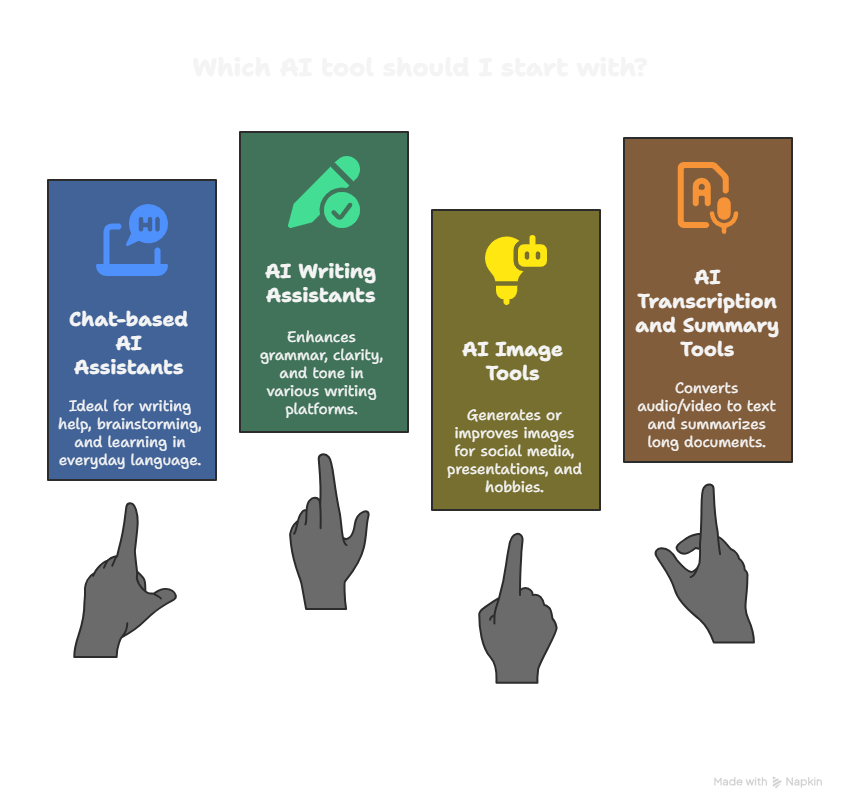
There are many types of AI tools. Here are a few categories beginners in the United States commonly use:
- Chat-based AI assistants
- You type a question or task, and they answer in everyday language.
- Great for writing help, brainstorming, and learning.
- AI writing assistants
- Tools that plug into your browser, email, or word processor.
- Help with grammar, clarity, and tone while you write.
- AI image tools
- Help generate or improve pictures, graphics, and thumbnails.
- Useful for social media, presentations, and creative hobbies.
- AI transcription and summary tools
- Turn audio or video into text.
- Summarize long documents, articles, or meeting recordings.
You don’t need to use everything at once. Start with one or two tools that solve a real problem you already have: writing, learning, organizing, or creating.
Tips for Getting Better Results from AI (Prompt Basics)
The quality of AI’s response usually depends on how you ask. Here are simple prompt tips:
- Be specific
- “Write a professional email asking for a meeting next week” is better than “write an email.”
- Give context
- Mention who you are and who the message is for.
- Example: “I am a college student emailing my professor.”
- Set the format
- Ask for bullet points, steps, or a short paragraph.
- Example: “Explain this in 5 bullet points.”
- Ask it to improve, not just create
- Paste your text and say: “Improve clarity and fix grammar while keeping my tone.”
- Use follow-up questions
- If the first answer isn’t great, ask: “Make this simpler” or “Give me a shorter version.”
You don’t have to be perfect. Think of AI as a helper you’re talking to. The more clearly you explain what you want, the better the help you’ll get.
Who Should Use AI (and Who Should Be Extra Careful)
AI can be helpful for many people:
- Students who want help understanding topics and organizing study time
- Office workers who write lots of emails and documents
- Small business owners and freelancers who create content and handle many tasks alone
- Parents who need simple explanations for complex topics
- Creators who make videos, blogs, or social media content
However, some people should be extra cautious:
- Anyone dealing with sensitive personal data
- People making serious financial, medical, or legal decisions
- Students and professionals in environments with strict rules about AI use
In those cases, AI can still be a helpful tool, but you should:
- Check policies from your school, workplace, or organization
- Treat AI output as a draft or starting point, not a final answer
- Confirm important information with trusted, authoritative sources
Key Takeaways
- AI is not science fiction; it’s a pattern-spotting technology that helps with language, images, and decisions.
- When you ask “what is Artificial Intelligence and how to use it,” the most practical answer is: start with simple, everyday tasks you already do.
- You can use AI today to write and improve text, generate ideas, learn faster, organize your life, and explore basic design concepts.
- AI is powerful but imperfect. It can be wrong, biased, or outdated, so you should always use your own judgment.
- The best way to learn AI is to treat it like a helpful assistant: talk to it clearly, give context, and refine your requests.
FAQs
What is AI in simple terms?
Artificial intelligence is technology that allows computers to perform tasks that usually require human thinking, such as understanding language, recognizing patterns, and making suggestions. In everyday life, it shows up as innovative features in apps, websites, and devices that help you work and communicate more easily.
Do I need technical skills to use AI?
No. Many modern AI tools are designed for regular people, not programmers. If you can type a message or speak into your phone, you can start using AI. The hardest part is often just getting comfortable asking for help.
Is AI free to use?
Some AI tools offer generous free plans with limits, while others require a subscription for full features. Many people start with free options to see whether AI fits their needs before paying.
Can AI replace my job?
AI can automate specific tasks, especially repetitive writing, summarizing, or organizing. However, it still struggles with complex judgment, emotional understanding, and real-world experience. The most practical approach is to learn how to use AI as a tool that supports your work, rather than seeing it purely as a threat.
Is it safe to paste my personal information into AI tools?
It’s best to avoid sharing highly sensitive information, such as passwords, medical records, or financial details. Treat AI tools like any online service: be cautious about what you share and read the privacy information if you are dealing with anything sensitive.
Can students use AI for homework?
AI can be a great helper for understanding topics, practicing explanations, and organizing notes. However, copying AI-generated work and turning it in as your own can violate school policies. Students should use AI to learn, not to cheat.
How do I know if AI is giving me correct information?
AI can sound confident even when it’s wrong. For important topics, especially involving health, law, or significant financial decisions, double-check information with reliable, authoritative sources, such as official websites or trusted professionals.
What is the easiest way to start using AI today?
Pick one small problem you have, such as writing an email, summarizing a long article, or planning your week. Open a chat-based AI tool and describe your situation clearly, then ask for help with that one task. Starting small helps you build confidence and understand how AI can fit into your routine.